

How to Use AI to Improve Academic Productivity: 10 Smart Tips (2026)
Introduction: The 2 A.M. Question Every Student Asks
It’s 2 a.m. Your notes are scattered across four apps, three notebooks, and a browser with 40 open tabs. You have a paper due tomorrow, and you still haven’t finished the reading.
Sound familiar?
Here’s the surprising part: the problem was never that you lack discipline. The problem is that you’re doing 2010-style studying in a 2026 world — one where AI can already do half the busywork for you.
That’s the real story behind how to use AI to improve academic productivity. It isn’t about replacing your thinking. It’s about removing the friction between you and your thinking, so you spend less time managing information and more time actually learning it.
This guide is built for beginners, students, and professionals who want a practical, honest, and actionable system — not just a list of trendy apps.
Who Should Read This Guide?
- School students
- College students
- University students
- Competitive exam aspirants
- Working professionals
- Lifelong learners
The Problem: Why Studying Feels Harder Than It Should
Most students aren’t struggling because the material is too hard. They’re struggling because of three invisible productivity leaks:
- Information overload — too many sources, not enough synthesis
- Context switching — jumping between apps kills deep focus
- No feedback loop — studying without knowing what you actually understand
Traditional productivity advice (to-do lists, color-coded planners) treats the symptoms. AI treats the cause, because it can read, summarize, quiz, and organize faster than any human assistant you could hire.
Takeaway: You don’t need more willpower. You need fewer bottlenecks.
Why It Matters: The Real Cost of Manual Studying
Every hour spent re-reading a textbook chapter to find one fact is an hour not spent understanding the concept behind it.
Research on cognitive load consistently shows that working memory is limited — when it’s clogged with low-value tasks (searching, organizing, retyping notes), there’s less capacity left for actual learning.
When you use AI productivity tools for students correctly, you shift your mental energy from finding information to using it. That shift is the single biggest lever in academic performance.
Did you know? Studies on retrieval practice show that actively recalling information (like AI-generated quizzes do) improves retention far more than passive re-reading — sometimes by 50% or more.
Productive studying isn’t about working longer. Research consistently shows that strategies like retrieval practice, spaced repetition, and reducing unnecessary cognitive load improve long-term learning more effectively than simply increasing study hours.
Signs Your Current Study System Is Hurting Your Productivity
- You reread notes repeatedly
- You constantly switch between apps
- You forget what you studied
- You spend more time organizing than learning
- You miss deadlines
- You don’t know what to revise next

Step-by-Step Guide: How to Use AI to Improve Academic Productivity
Common Productivity Tasks AI Can Automate
Examples:
- Organizing notes
- Summarizing PDFs
- Creating quizzes
- Flashcards
- Revision planning
- Lecture transcription
- Research organization
- Weekly planning
Step 1 — Centralize Your Inputs First
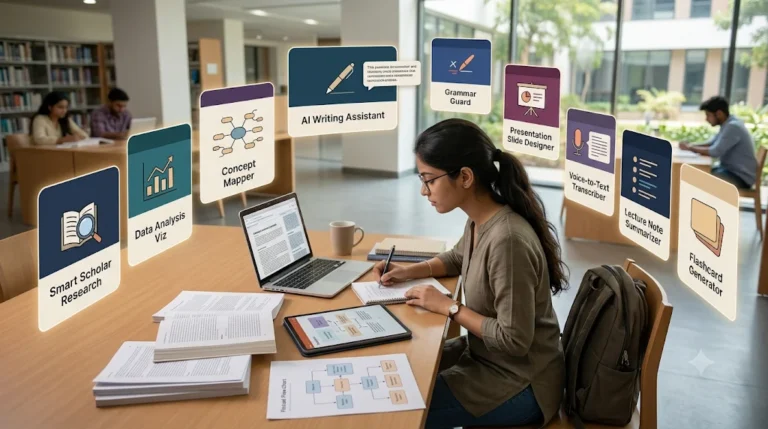
Before adding any AI tool, put all your source material (PDFs, slides, articles) in one place. AI tools work best when they can access everything at once, not fragments.
- Example: A biology student drags all lecture PDFs into one folder before summarizing them, instead of processing them one at a time in different chats.
- Action Step: Create one “Active Semester” folder today.
Step 2 — Use AI to Summarize, Not Replace, Reading
AI summaries are a map, not the territory. Use them to preview a chapter before reading, or to review after.
- Common Mistake: Reading only the AI summary and skipping the source — this creates shallow, fragile knowledge.
- Pro Tip: Ask the AI to summarize in the form of questions, not statements. Questions force recall.
Understanding a lesson is only the first step. The real challenge is turning it into revision material. For that, read How to Turn Class Notes into Exam Revision Notes with AI: Powerful 2026 Student Success Guide and see how students are converting class notes into powerful exam-ready summaries.
Step 3 — Turn Notes Into Practice Questions Automatically
This is where my study tips get powerful. Instead of manually writing flashcards, feed your notes into an AI tool and generate a quiz in minutes.
- Why it works: Testing yourself is proven to build stronger memory pathways than rereading.
- Action Step: After every lecture, generate 10 questions from your notes before you leave the library.
Struggling to remember what you studied? After improving your focus, the next step is turning your notes into interactive quizzes. Learn how to create practice tests from notes using AI to revise smarter, test yourself faster, and boost exam confidence.
Step 4 — Build an AI Study Workflow, Not a One-Off Habit
A single ai study workflow might look like this:
- Record or upload lecture → AI transcribes/summarizes
- AI generates key questions
- You self-test within 24 hours
- AI generates a spaced-repetition schedule for review
This is far more sustainable than randomly opening an AI tool when you’re overwhelmed.
Most students use AI as a simple chatbot, but the real advantage comes from following a complete workflow. Discover our AI study workflow for students and learn how to capture notes, create quizzes, schedule revision, and prepare for exams more effectively.
Step 5 — Use AI for Research, With Verification Built In
When using AI to improve academic productivity tools for research, always ask for sources — and check them. AI can point you toward real papers faster than manual searching, but it can also get citations wrong.
- Common Mistake: Trusting AI-generated citations without checking they exist.
- Pro Tip: Cross-check every citation on Google Scholar before submitting any assignment.
How to Build an AI Academic Productivity System
Capture Information
↓
Organize Notes
↓
Understand Concepts
↓
Create Practice Questions
↓
Revise Weekly
↓
Track Progress
↓
Improve Weak Areas
Features and Benefits of AI-Driven Academic Productivity
- Faster synthesis of long readings into digestible summaries
- Automatic quiz and flashcard generation from your own notes
- Lecture transcription so you can focus on listening, not writing
- Personalized review schedules based on what you actually forget
- Writing support for outlining, structure, and clarity (not ghostwriting)
So what? These aren’t nice-to-haves. Together, they can reclaim several hours per week — time you can reinvest in deeper understanding or rest.
Want to learn the practical ways students are already using AI in everyday learning? Read our complete guide on How Students Use AI to Study Smarter (Without Cheating) and discover 12 proven techniques to improve learning, revision, and exam preparation.
Real Examples: What This Looks Like in Practice
Example 1 — The Overwhelmed Pre-Med Student Instead of manually transcribing 3-hour lectures, a student uses an AI transcription tool, then converts the transcript into a 10-question quiz. Study time per lecture drops from 90 minutes to 40.
Example 2 — The Research Paper Crunch A graduate student uses an AI research tool to surface relevant papers by topic instead of manually scanning databases, cutting literature review time roughly in half — while still manually verifying every source.
Takeaway: The pattern is the same — AI removes the mechanical work, the student keeps the thinking.
Common Mistakes That Reduce AI Productivity
Using too many AI tools
Trusting AI without verification
Skipping active recall
Never reviewing notes
Depending entirely on summaries
No weekly review
Practical Use Cases for AI in Academic Productivity
- Summarizing dense textbook chapters before class
- Turning messy handwritten notes into structured outlines
- Generating practice exam questions from lecture slides
- Explaining a confusing paragraph in a research paper in plain English
- Creating a personalized revision calendar before finals
Expert Tips to Improve Academic Productivity Faster
Use one workspace
Save your best prompts
Batch similar tasks
Review weekly
Verify AI outputs
Schedule deep work
Use AI for planning, not thinking
Comparison: Best AI Tools by Academic Task
Use this quick-scan comparison to pick the right tool for the right job — no giant tables, just what you need.
🧠 Note-Taking & Summarization
Best Tools:
Strengths:
- Turns long lectures/articles into structured notes
- Highlights and saves key ideas as you read
Watch Out:
- Don’t skip the original material entirely — summaries lose nuance.
📚 Research & Literature Review
Best Tools:
Strengths:
- Surfaces relevant academic papers by topic
- Shows evidence-based summaries of findings
Watch Out:
- Always verify citations manually before using them in a paper.
🎙️ Lecture Transcription
Best Tools:
Strengths:
- Converts speech to searchable text in real time
- Frees you from note-taking during class
Watch Out:
- Review transcripts for errors in technical terms and names.
🗂️ Flashcards & Quizzes
Best Tools:
Strengths:
- Auto-generates quizzes from your own notes
- Supports active recall, which improves retention
Watch Out:
- Generated questions can be too easy — mix in your own harder ones.
📄 Paper Explanation
Best Tools:
Strengths:
- Breaks down dense academic language into plain English
- Highlights methodology and key findings quickly
Watch Out:
- Useful for comprehension, not a substitute for close reading.
7-Day AI Productivity Challenge (follow for next 7 days)
Day 1 → Organize study materials
Day 2 → Summarize one chapter
Day 3 → Create quiz questions
Day 4 → Build revision plan
Day 5 → Review weak topics
Day 6 → Study using active recall
Day 7 → Reflect and improve
Common Mistakes to Avoid
- Outsourcing thinking, not just tasks. AI should reduce friction, not replace understanding.
- Skipping verification. AI-generated facts and citations must be checked.
- Tool-hopping. Using five different AI apps randomly creates more chaos, not less.
- No review system. Generating notes or flashcards without a spaced-repetition schedule wastes their value.
Best Practices for Sustainable AI-Powered Studying
- Pick one AI tool per task category (notes, quizzes, research) instead of many
- Review AI outputs within 24 hours while the context is fresh
- Always fact-check anything used in graded work
- Treat AI as a study partner, not an answer key
Pro Tips
- Ask AI tools to explain concepts “like I’m a beginner” first, then “at an expert level” second — this builds layered understanding.
- Use AI-generated summaries as a pre-reading primer, not a replacement for the reading.
- Set a weekly 15-minute review of your AI-generated flashcards; consistency beats cramming.
What Happens After 30 Days of Using AI Productively?
Possible outcomes:
- Better focus
- Faster note organization
- More completed study sessions
- Less procrastination
- Better revision habits
- Stronger exam confidence
- Lower stress
- More consistent learning
FAQ
- Is it cheating to use AI for academic productivity? Using AI to organize, summarize, or quiz yourself on your own understanding is generally considered a productivity aid, not academic dishonesty. Using AI to write graded work for you usually is. Always check your institution’s specific policy.
- What is the best AI tool for improving study productivity? There’s no single “best” tool — it depends on the task. Use transcription tools for lectures, summarization tools for reading, and quiz-generation tools for review.
- Can AI actually improve learning, not just save time? Yes, when used for active recall (quizzes, self-testing) rather than passive consumption (just reading summaries), AI can meaningfully improve retention.
- Do I need to pay for AI tools to see academic productivity gains? No. Most tools mentioned here offer functional free plans that are enough for a typical student workload.
Key Takeaways
- AI improves academic productivity by removing mechanical busywork, not by replacing thinking.
- The most effective ai study workflow combines summarization, active recall, and spaced review.
- Always verify AI-generated facts and citations before submitting academic work.
- Consistency with a small toolset beats randomly trying many tools.
Conclusion
Learning how to use AI to improve academic productivity isn’t about finding a magic app. It’s about building a simple, repeatable system: centralize your material, let AI handle the mechanical work, and spend your own energy on understanding and recall.
Start small. Pick one tool from one category above, use it for a single week, and notice how much mental space it frees up. That’s the real win — not saved minutes, but saved focus.




10 Comments